

Move-in Guide
Activate & Set Up
Ting Fiber Internet is already active at your address. Set up your account and Wi-Fi using the Eero app.
- The new move in resident needs to reset the Eero,
Step 1: Perform factory reset
- Ensure it is powered on for at least 45 seconds
- Press and hold the small reset button on the back/bottom for 15 seconds until the LED flashes red.
- The device will then reboot and flash blue, indicating it is ready to be reconfigured.
- Once it is flashing blue, the Eero is reset.
Step 2: Set up a new network via the app
- Open the eero app and follow the on-screen instructions to set up a new network.
- The app will guide you through the process, which may include entering the serial number for your eero.
- Create a new Wi-Fi name and password for your network.
- If no equipment is installed, call Ting for installation
- DirecTV: call 800-531-5000 to start service and receive your Gemini stream boxes.
Equipment & Wi-Fi
The following equipment should already be installed in your home:
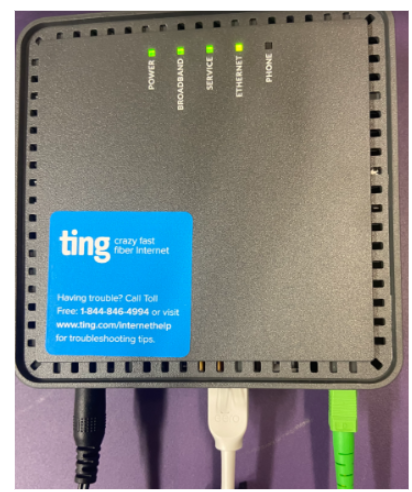
- Optical Network Terminal (ONT)-black box
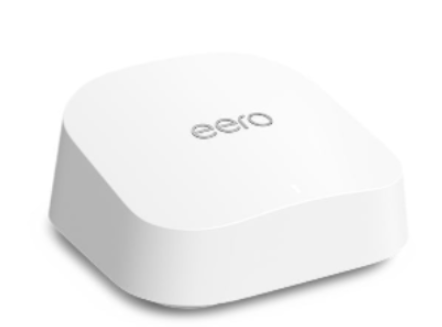
- Eero 7 mesh Wi-Fi router-white box
- Eero features:
- Covers ~2,000 sq. ft. with reliable Wi-Fi 7 speeds
- Smart mesh technology eliminates dead zones
- Built-in Zigbee hub for smart devices (works with Alexa)
- Learn more: internet.ting.com/help-center-articles/what-can-my-eero-7-do-for-me
Billing
Your Ting Internet and DirecTV package are included in your HOA dues - no separate bill or login required.
Upgrade costs for extra channels or packages are billed by DirecTV.
DIRECTV Service:
The bulk DirecTV package includes
- Two Gemini streaming devices with voice remotes (shipped to your door)
- Entertainment package
- Max bundle (HBO, Cinemax, Max app)
- Paramount+ with Showtime
- Gemini device notes:
- Easy self-install with included instructions
- Voice remote requires a Gmail account for voice features
- For support or upgrades, call DIRECTV: 866-258-8766
Moving Out
Before moving out, please notify Laguna Woods Village. They will update Ting on your behalf.
Leave Behind (Do Not Remove or Unplug)
These devices are linked to your unit and must stay in place:
- Ting ONT modem
- Eero 7 router
Take with You
Take these devices with you when you move:
- DirecTV Gemini streaming devices
- DirecTV voice remotes
At your new home, call DIRECTV (866-258-8766) to set up your new account and reconnect your devices.
Need Help?
Ting Internet Support: 1(844)-846-4994 tinginternet.com/lagunawoodsvillage
DirecTV Support: 866-258-8766 (Mon–Fri: 5 AM–9 PM PST; Sat: 6 AM–7 PM PST; Sun: 7 AM–3 PM PST)


.svg)